
Integration scenarios
These scenarios show how the HotelPlatform APIs work together in real hotel integrations: a property management system (PMS) feeding reservations, a self check-in kiosk that issues key cards, a guest web app with PIN codes, card payments at the front office, and clients that stay in sync through webhooks and workflows. Each scenario links to the API categories it uses.
A PMS pushes reservations and profiles
A PMS, a channel manager or any other third-party client keeps the HotelPlatform up to date with its hotel reservations. It creates every new booking with its stays and guest profiles, and sends changes as they happen in the PMS.
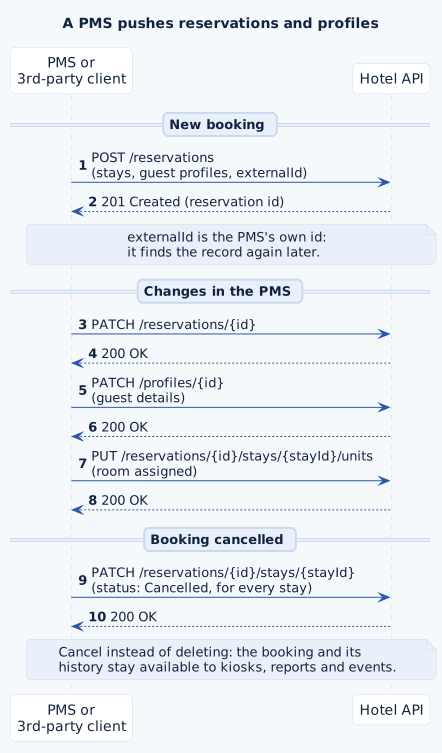
- Create and update bookings with the Reservations endpoints. Send the PMS's own id as
externalId, so you can find the reservation again without storing HotelPlatform ids. - Keep guest data in Profiles: name, contact details, addresses and preferred language.
- Arrival, departure, room assignment and services belong to the Stays of a reservation.
- When a booking is cancelled, set the status of its stays to
Cancelledinstead of deleting the reservation. The booking and its history stay available, and subscribers receive astayUpdatedevent they can act on.
Self check-in kiosk issues a key card
A kiosk in the lobby checks guests in without the front desk. It reads the reservation, lets the guest complete the registration, encodes a key card for the stay and hands it out from the card dispenser.
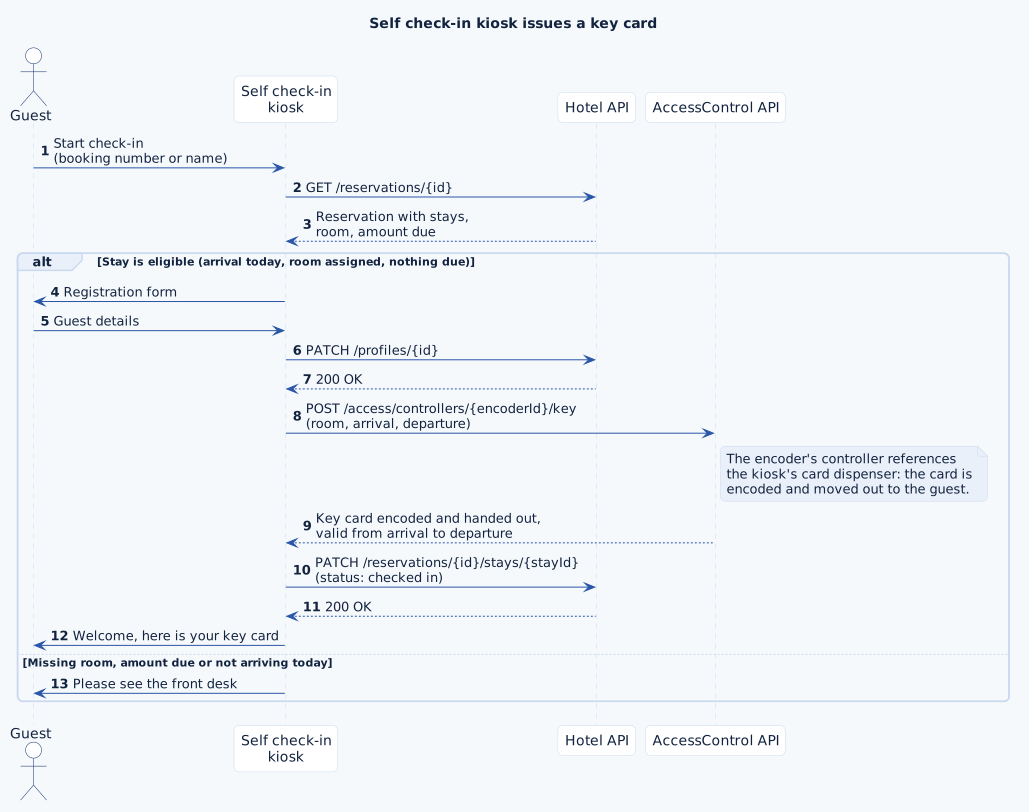
- Look up the booking in Reservations and check that the stay is eligible: arrival today, a room assigned and no amount due.
- Save the registration details to the guest's profile.
- Encode the key card with Key (Create a Key,
POST /access/controllers/{controllerId}/key) on the card encoder's controller. When that controller references the kiosk's card dispenser, the same call moves the card out to the guest; no separate dispenser request is needed. CardDispenser is there for the dispenser's status and maintenance. - Set the stay to checked in through Stays. The encoder and the dispenser are set up once in the Configuration API.
Guest web app issues a PIN code
Guests who arrive late or skip the front desk get a PIN code for their room in a web app, linked from the booking confirmation. The PIN is valid from arrival to departure only.
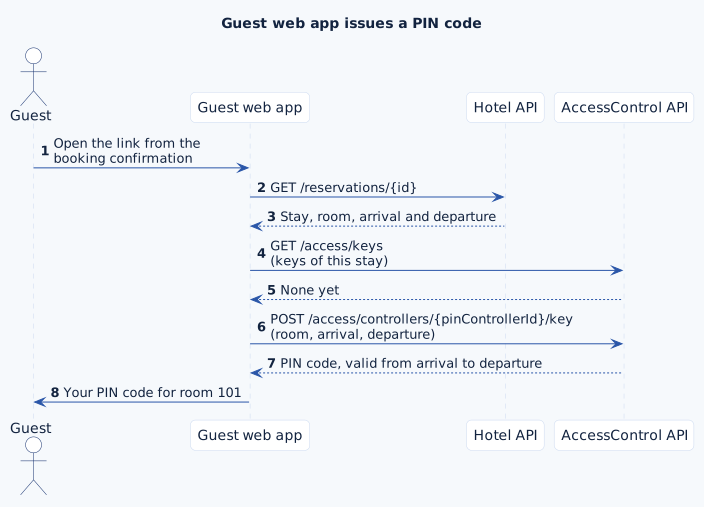
- Read the stay from Reservations, then create the PIN code with Key (Create a Key) on the controller of the PIN locks; a controller's type decides whether it issues key cards or PIN codes.
- Before creating one, list the stay's keys with Key and show the PIN it already has: a guest who opens the app twice should not get a second code. To guarantee one PIN per reservation, let a workflow issue it (see the n8n example below).
Front office takes a payment on a terminal
The front office collects the amount due on a card terminal. A payment intent starts the transaction on the terminal; once it completes, the payment is recorded on the reservation. See the Payment API reference.
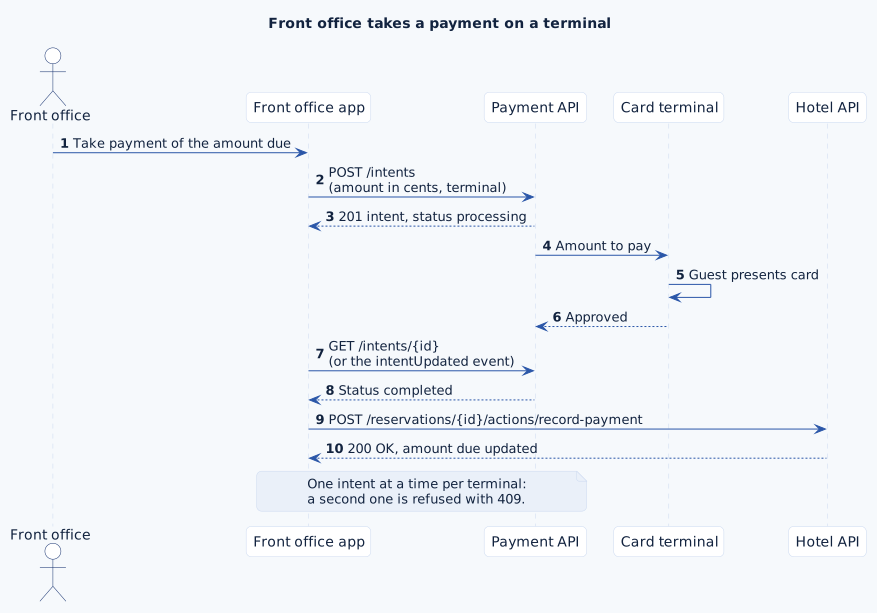
- Start the transaction with a payment intent (
POST /intents, amount in the lowest currency unit). It returns at once with statusprocessing; the result arrives as theintentUpdatedevent or on a later read. - A terminal handles one transaction at a time: a second intent for the same terminal is refused with
409until the first one is final. - Record the payment on the booking with Payments in the Hotel API.
A client keeps in sync through webhooks
Changes made by kiosks, web apps or the front office have to reach the PMS and other systems. Instead of polling, a client subscribes to the events it needs and receives them as signed webhooks.
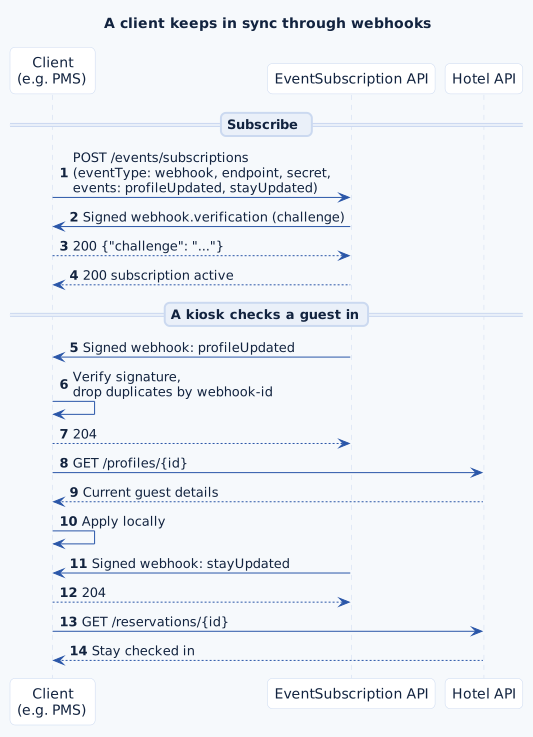
- Create a webhook subscription with Subscription, listing events such as
profileUpdated,stayUpdatedorkeyCreated. Your endpoint has to answer the signed verification challenge before the subscription is active. - Check every request as described in Webhook security, and use
webhook-idto drop duplicates. - By default an event carries the resource type and id; read the current record from the Hotel API. With
dataRequired: truethe full event data comes along.
Pre-arrival PIN code built in n8n
Workflow tools such as n8n, Make or Zapier receive the same webhooks and turn events into automations without code on your servers. In this n8n example, a new booking triggers a pre-arrival email with the guest's PIN code.
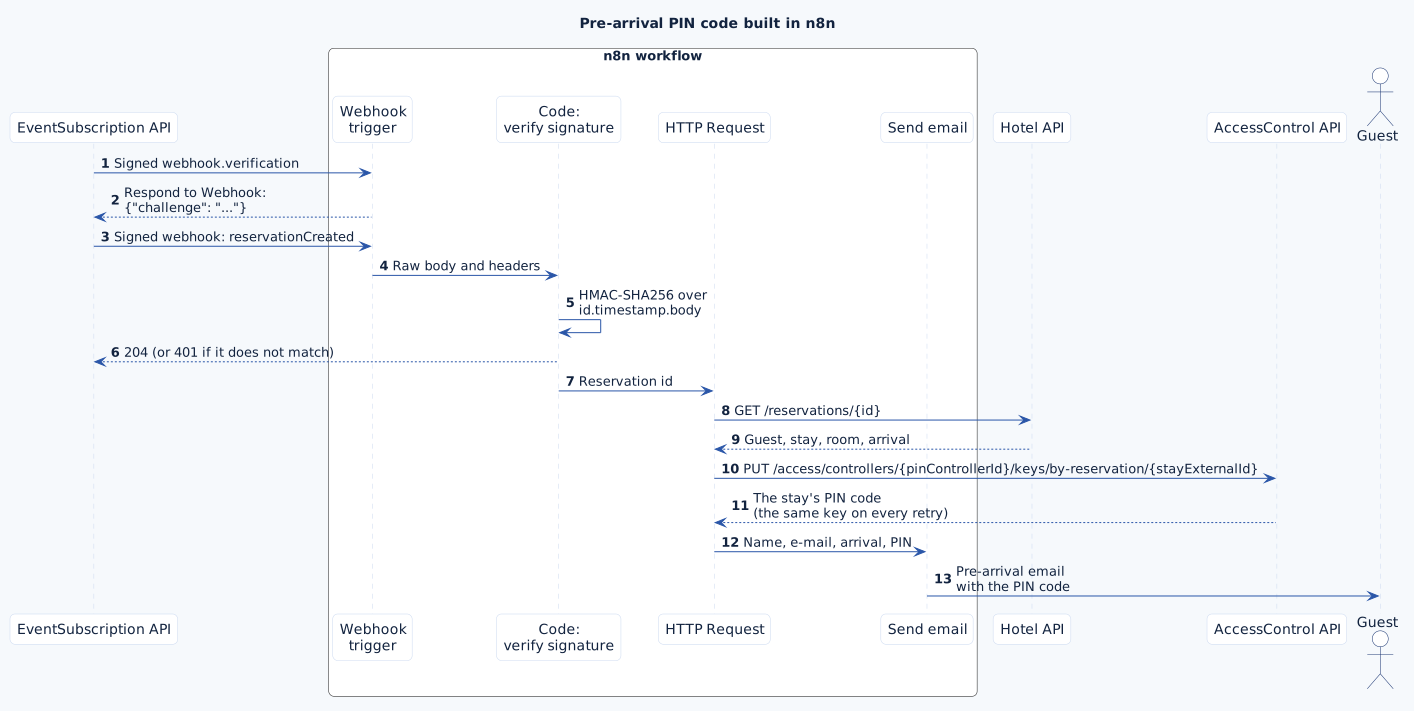
- A Webhook trigger receives the events; a Respond to Webhook node echoes the
challengeof the verification request so the subscription becomes active. - A Code node checks the signature over the raw body (Webhook security) and stops the workflow when it does not match.
- One HTTP Request node reads the reservation from Reservations; a second one issues the PIN with Key (Create or Reconcile a Key for a Stay). That call is idempotent: when n8n retries or the event arrives twice, the stay keeps its single PIN code. An email node sends the message. For workflows on your own workflow server, a subscription with
eventType: workflowstarts the workflow directly.