
# Getting started
# Mock the API
The fastest way to get started with the API is to use a mock server. A mock server is a simulation of the real API that you can use to test your requests and responses. You can use the mock server to explore the API, test different endpoints, and see how the API responds to different requests. There are many different mock servers which are ready in minutes, here is one example:
globally install the prism-cli package:
npm install -g @stoplight/prism-cli
mock the API:
prism mock https://documentation.hotelplatform.io/docs/AccessControl/latest/openapi.json
See the Prism documentation (opens new window) for more advances use cases on how to use the mock server.
# Authentication
# Client credentials
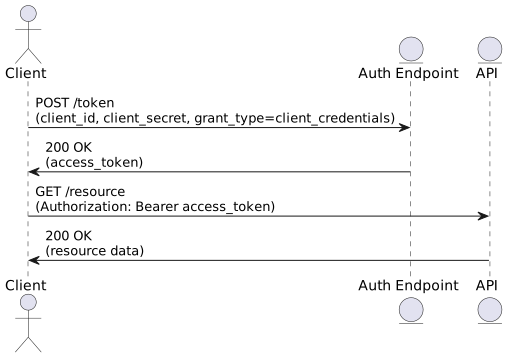
For trusted clients where the client credentials can be stored securely, we recommend using the client credentials flow. This flow is suitable for server-to-server communication where the client can securely store the client ID and secret.
This represents the client credentials flow in a simple way:
- The client requests an access token from the authorization endpoint using its credentials.
- The authorization endpoint issues an access token.
- The client uses the access token to access a protected resource from the API.
# Authorization code with PKCE
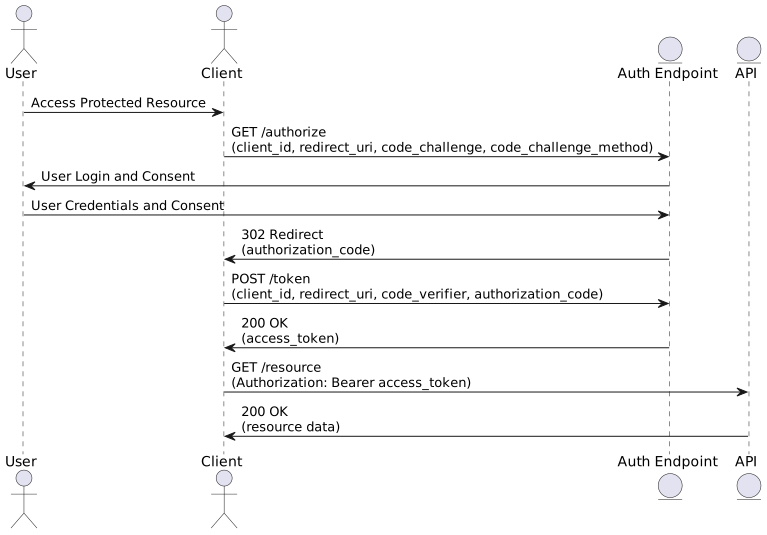
We utilize the industry-standard OAuth2 authorization flow with Proof Key for Code Exchange (PKCE) to ensure secure access to the system.
The flow can be described as follows (simplified):
- User Accesses Resource: The user attempts to access a protected resource, prompting the client to begin the OAuth flow.
- Authorization Request: The client sends a request to the authorization endpoint with the code_challenge (derived from code_verifier) and code_challenge_method (typically S256).
- User Authentication: The user authenticates and grants consent.
- Authorization Code: The authorization endpoint redirects back to the client with an authorization_code.
- Token Request: The client exchanges the authorization_code for an access_token, including the code_verifier.
- Access Resource: The client uses the access_token to request the protected resource from the API.
This simplified overview provides a basic understanding. We recommend to use a library or SDK that handles the OAuth2 flow for you.
# Multiple tenants
Our system supports multiple tenants, which means that you can use the same API to access different data sets. To access a specific tenant, you need to include the X-Tenant-Id header in your requests. The X-Tenant-Id header specifies the tenant you want to access, and the API will return data specific to that tenant.
It is not possible to return data for multiple tenants in the same request. You need to make separate requests for each tenant you want to access. Its possible to access multiple tenant with the same credentials, but you need to specify the tenant id in the request.
You need to request access to a specific tenant from the system administrator. The system administrator will provide you with the tenant ID, which you can then use to access the tenant's data.
If you do not set the X-Tenant-Id header in your requests, the API will return data for the default tenant.
# Headers
If not otherwise stated, the following headers need to be present.
In all requests:
Accept: application/vnd.api+jsonX-Tenant-Id: <your-tenant-id>
In POST, PUT, PATCH requests:
Content-Type: application/vnd.api+json
and will produce a response with the same headers.
# Recommendations
Client SDK: We recommend to use or create a library or SDK for your programming language which handles the API requests and responses for you. This will save you time and effort, and ensure that your application is secure and reliable.
Base url: please make sure you use a baseUrl parameter in your requests, so you can easily switch between different servers and environments.
# Request live access
Before we can grant you live access to the API, you need to provide the following information:
- Your application name and description
- The intended use of the API
- The expected number of requests per day
- The expected number of clients
- The hotel you want to connect with
We will then request permission from the tenant administrator to grant you access to the API.
# Errors
The API uses standard HTTP status codes to indicate the success or failure of a request. The response body will contain additional information about the error, including an error code, a message, and a description of the error.
{
  "errors": [
    {
      "status": "400",
      "title": "Bad Request",
      "detail": "The request is invalid or malformed."
    }
  ]
}
# Versioning
We will release minor versions for bug fixes and new features, and major versions for breaking changes.
# Changelogs
We provide changelogs for each version of the API. The changelogs contain information about new features, bug fixes, and breaking changes. You can find the changelogs in the Changelog section.